Initiative Dependency Report

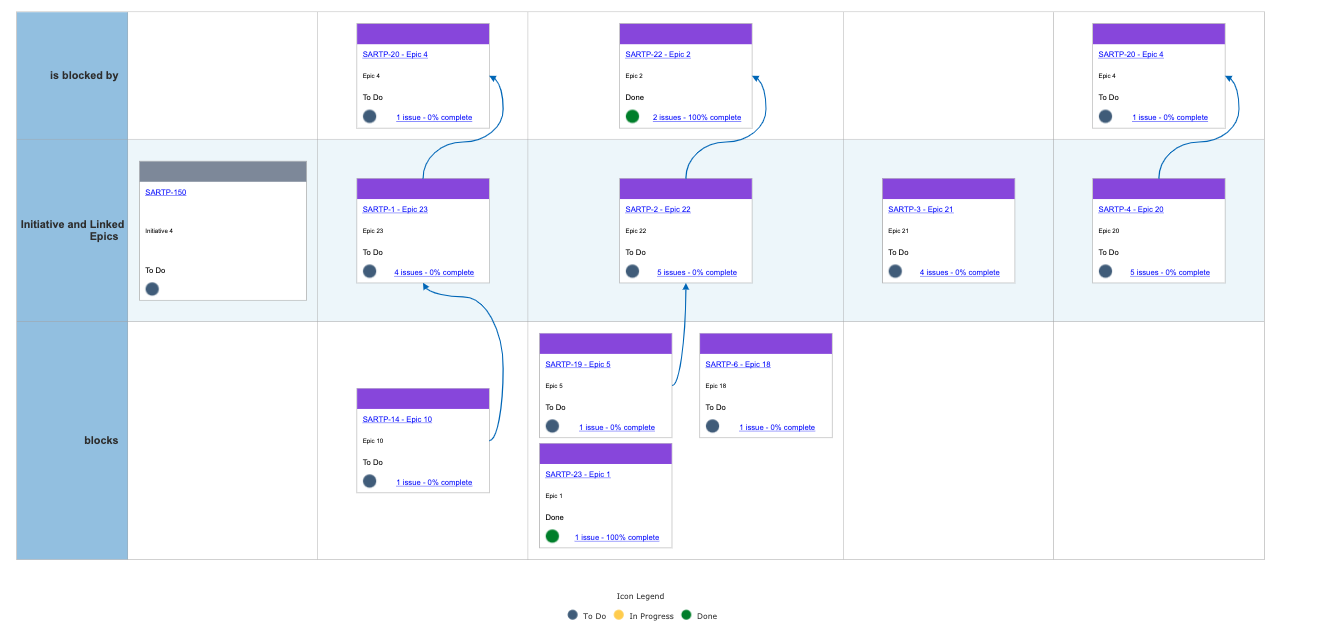
The Initiative Dependency Report is visualizing the Features linked to an Initiative, and also shows the dependencies between the Features. This is a great report when working in Portfolio SAFe®.
When you first launch the script, it will ask for a series of parameters.
First is the issue key of the Initiative.
Second is True/False whether you are using Portfolio for Jira or not. Why? If you set it to True, it will look for the “Parent Link” field that comes with Portfolio for Jira to find Features linked to the Initiative. If set to False, the script will look at the “Relates” link in Jira.
Third is the link type being used to link the Epic’s underlying issues (Stories and Tasks) dependencies.
When visualizing the report, the far left is the Initiative, and the center row shows the different Epics linked to that Initiative. This is via the Parent link if using Portfolio for Jira, or the Relates link if not.
The bottom and top rows show the dependencies between the Epics. These dependencies are configured at the Story (or Task) level. Meaning if you are using the Blocks link type between Stories, an Epic to Epic dependency in the report will show the dependency line because there are dependencies using the Blocks link type at the Story level.
Please sign in to leave a comment.
Comments
0 comments